Last Updated on 23 April 2026 by Gary Perspective Gadgets
Sick of Adverts Following You? Why It’s Time to Switch to Firefox (A Senior’s Guide)
As an Amazon Associate I earn from qualifying purchases. This post may contain affiliate links — if you click through and buy, I may earn a small commission at no extra cost to you.
Have you ever searched for comfortable walking shoes online, only to have adverts for those exact shoes follow you around the internet for days? If you’re fed up with that creepy feeling, it might be time to switch to Firefox.
That’s exactly how the most common browser, Google Chrome, makes its money. Every search you do helps build a profile that gets sold for targeted ads.
After looking closely at the options available in 2026, my clear recommendation for fellow seniors who want a calmer, more private internet is to switch to Firefox from Mozilla.
Here’s why – in plain English, with real examples from my own use.
1. It Stops the “Digital Shadow” Following You (Much Better Privacy)
Chrome tracks almost everything to feed Google’s advertising business. Firefox is run by the Mozilla non-profit foundation whose whole mission is an open, safe internet – not selling your data.
Firefox turns on Enhanced Tracking Protection (blocks hidden trackers and fingerprinting scripts that try to identify you across sites) by default in Standard mode. You can set it to Strict if you want even more blocking (though Strict sometimes breaks a few sites, which means they will not open, however you can add exceptions).
The real benefit for us: Far fewer creepy personalised adverts chasing you from site to site. My online banking, Age UK pages and BBC News feel cleaner and less intrusive since I switched.
2. It Keeps Older Computers Feeling Snappier (Better Memory Handling) It gives a balance between memory use and privacy.
If your laptop or desktop starts slowing down, fans whirring loudly or battery draining fast with just a few tabs open (news + email + a recipe perhaps), Chrome is often the culprit. It’s famous for using a lot of RAM (computer memory).
Firefox tends to manage memory more efficiently in everyday use, especially with lots of tabs (Websites) open. Independent 2025–2026 browser tests, show it often uses noticeably less RAM than Chrome when you have 10–30 tabs — sometimes up to half as much in really heavy sessions on older machines.
The benefit for you: Your computer stays responsive longer, less possibility of crashing. You can keep BBC News, and your grandchildren’s school portal open all day without the machine complaining like it used to on Chrome.
3. Reader View – A Godsend for Tired Eyes
News sites these days are full of flashing video ads, pop-up newsletter boxes, sidebars and auto-playing nonsense. Sometimes it can be exhausting to read anything, it’s like looking through the woods, even forest, to see the trees.
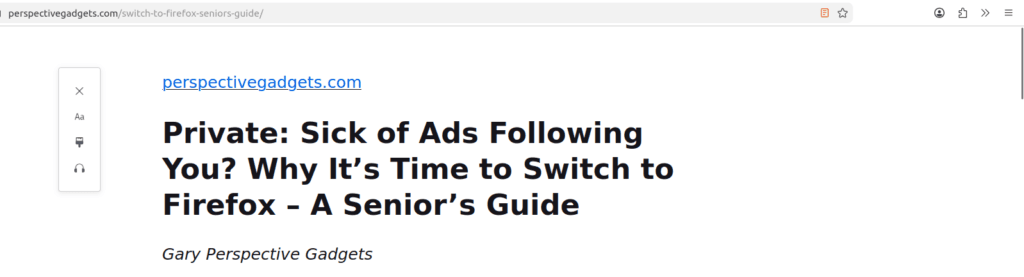
Firefox has the best Reader View I’ve found. Click the little document/page icon in the address bar (looks like lines of text) and – poof! – all the clutter which is making your life difficult suddenly vanishes. You’re left with clean text, the main photos, and a calm background, which is much easier to read. Suddenly the Woods/Forest has disappeared and you can clearly see the Trees.
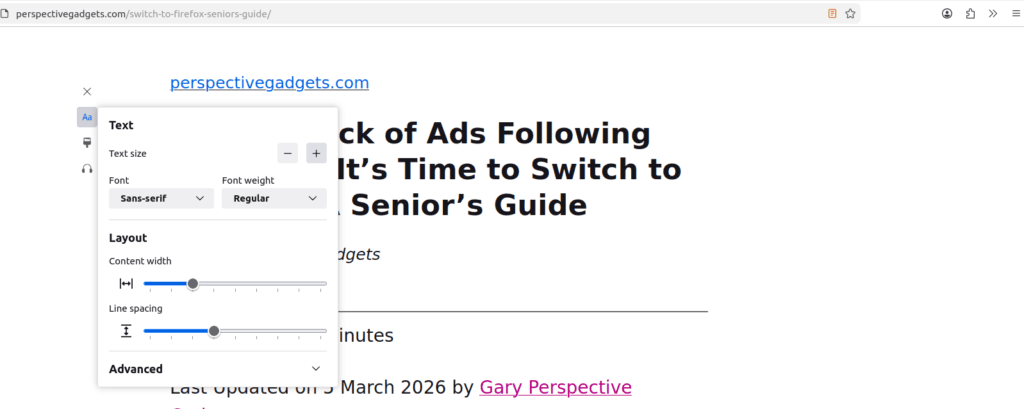
You can make the font larger, change the spacing, switch to a sepia or dark mode – whoever’s easiest on your eyes in the evening. I use it every night for the Telegraph or Guardian articles. Makes reading feel like holding a proper newspaper again. Reminds me of the World before the Wonders of the Internet. Some of us remember using dial up modems that used to whistle when connecting, you could not use the house phone when using them and you paid for a long distance telephone call when connected to the early internet, last century stuff !!!
Honest note: Many adverts still get through but Firefox gives you the cleanest experience I’ve found in 2026.
4. What About Advert-Blocking on Chrome?
You can block some adverts on Chrome — but it takes extra effort, and Google has been making it harder.
In 2024–2025, Google changed the rules for Chrome extensions (add-ons) under something called Manifest V3. Without going into the engineering detail, this change limits how powerfully ad-blocking tools can work inside Chrome. The most popular ad-blocker, uBlock Origin, now shows a warning in Chrome saying it may not work as well as it used to — and the older, more powerful version will eventually stop working in Chrome entirely.
It is a bit like asking your newsagent to hide all the magazines. Google’s entire business depends on advertising revenue — so a browser that perfectly blocks all adverts is not in their interest.
Firefox takes a fundamentally different approach — see below.
5. What Firefox Does Out of the Box — and What It Doesn’t
I want to be precise here, because “Firefox blocks some adverts automatically” is not quite accurate — and I would rather give you the honest picture.
What Firefox does the moment you install it, with nothing extra added:
It switches on Enhanced Tracking Protection automatically. In plain English this blocks three things:
Trackers — invisible scripts embedded in websites that follow you silently from site to site, building a profile of your interests to sell to advertisers. You never see them. They see everything.
Fingerprinting scripts — a clever technique where hidden code checks dozens of tiny details about your computer (screen size, fonts installed, time zone, graphics settings) and combines them into a unique “fingerprint” that identifies you even if you clear your cookies. Think of it as your computer’s invisible name badge that websites read without asking permission.
Cryptominers — rogue scripts that secretly use your computer’s processing power to generate online currency for criminals, often making your computer run slowly and your fan spin loudly for no obvious reason.
What Firefox does NOT block out of the box:
Display adverts — banner ads, sidebar pictures, promoted results. You will still see these on most websites in standard Firefox.
The practical result even without anything extra installed: Fewer “that shoe has been following me for a week” moments. Less being tracked between sites. A quieter, calmer feel — particularly on news sites. Noticeable, but not the same as full ad-blocking.
6. How to Add Proper Advert-Blocking to Firefox (Three Clicks)
To remove most banner advertising as well, you need one free add-on called uBlock Origin. On Firefox it works at full power — no restrictions, no compromise.
Here is how to add it:
- Open Firefox
- Click the three horizontal lines ☰ in the top right corner
- Click Extensions and themes
- In the search box type uBlock Origin
- Click the result showing the red shield icon
- Click Add to Firefox
- Click Add when the confirmation box appears
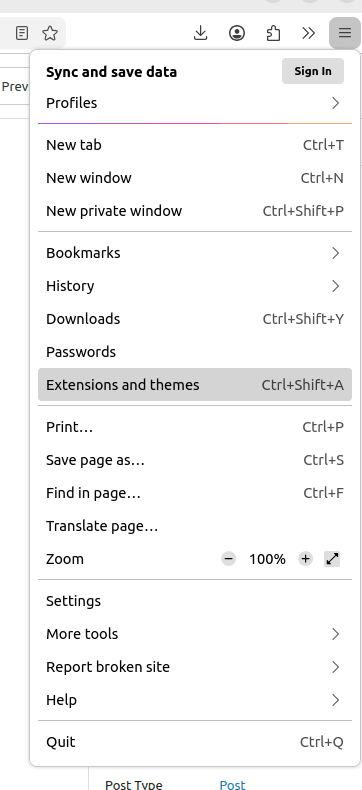
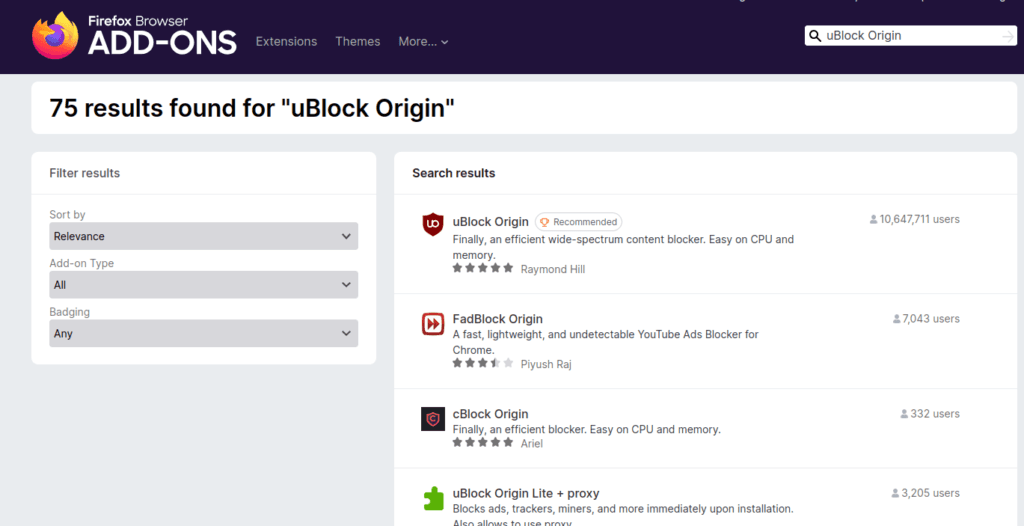
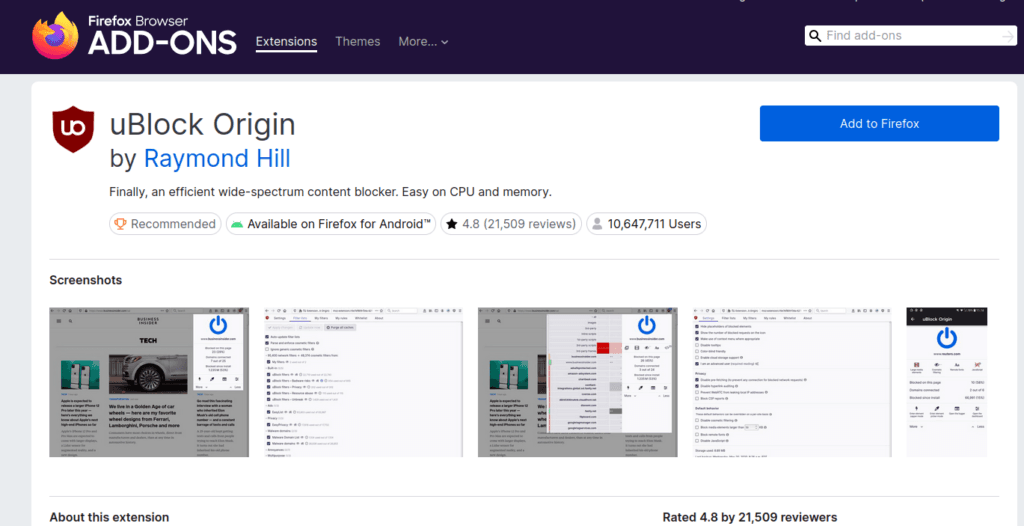
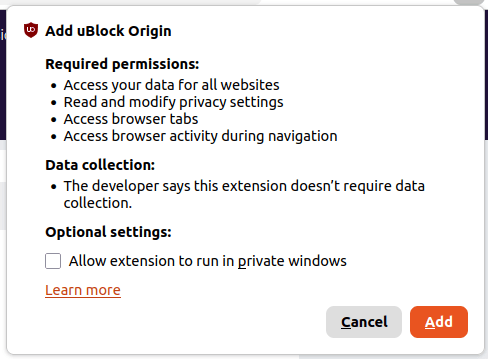
That is it. No account needed. No payment. No settings to configure. It works immediately.
After installing it you will notice a small red shield icon appears in your toolbar. Most banner adverts on news sites, recipe sites, and general browsing simply disappear. Pages often load faster too, because your browser is no longer downloading dozens of advert images it previously had to show you.
One honest note: A small number of websites detect ad-blockers and ask you to turn it off or subscribe. The BBC, NHS, and most government sites do not do this. Some newspapers do. The choice is always yours — uBlock Origin makes it easy to pause blocking for individual sites if you want to support them.
| Feature | Google Chrome | Mozilla Firefox |
| Tracker blocking | Limited, needs add-on | ✅ Built-in, ON by default |
| Fingerprint script blocking, not your finger print, see 5 above for an explanation. | Limited | ✅ Built-in, ON by default |
| Advert blocking out of the box | ❌ No | ❌ No |
| Advert blocking with uBlock Origin | Weakened by Google’s 2024 rule changes | ✅ Full-power uBlock Origin works perfectly |
| Who benefits from your data? | Google’s ad business | Nobody — Mozilla is a non-profit |
The real-world difference for you: Even without the uBlock Origin add-on, Firefox feels noticeably cleaner and quieter than Chrome — fewer creepy “that shoe is following me” adverts, less tracking between sites. Add uBlock Origin and most banner advertising disappears entirely. My online banking, NHS pages, and BBC News all feel calmer as a result.
Making the Switch Is Straightforward
Download Firefox directly from the official Mozilla website: https://www.mozilla.org/firefox/new/
When you first run it, it offers to import your bookmarks, saved passwords and even open tabs from Chrome in about 60 seconds. No fuss.
Try it for a week on your main computer. Keep Chrome installed as a backup if you like – most people find they don’t go back once they experience the quieter, faster feel.
The internet doesn’t have to feel like it’s watching you. A small switch like this can make daily browsing much more pleasant – especially when you’re checking the weather, looking up health advice or just reading about the grandchildren.
Stay safe out there.
(First published 4 March 2026)
About The Author