Last Updated on 4 April 2026 by Gary Perspective Gadgets
Phones get old too, just like we do: Is Your Mobile Phone Still Safe to Use in 2026?
As an Amazon Associate I earn from qualifying purchases. This post may contain affiliate links — if you click through and buy, I may earn a small commission at no extra cost to you.
Phones get old too, just like we do, even though we feel young at heart, and remembering all the words from a pop song from the 60’s but cannot remember where we left our car keys !!! See my own recent review on finding car keys more. Your phone might still make calls, send messages, take wonderful photos of your grandchildren, and browse the web perfectly well, but if it’s running old software, it can miss some important security fixes that help keep bad guys, hackers out.
As a retired Chartered Civil Engineer (B.Sc., C.Eng., MICE) with over 40 years of experience designing infrastructure built to last, I learned one fundamental principle: proper maintenance determines safety, not age alone. The same applies to your smartphone—regular phone security updates are what keep your device safe, not its physical condition or age.
When we designed and built a bridge, we expected it to stand for over 120 years. It was mandated in the UK Construction Standards. However that depends on regular inspections and regular maintenance. This of course assumes that there is money set aside, budgeted for maintenance. If a bolt gets rusty, you need to replace the bolt. The bridge doesn’t suddenly become “incompatible” with the cars driving over it just because a new model comes out. The old adage, A stitch in time saves nine. As an example think about Potholes in our roads these days. If they are fixed early it is a simple patch, if not maybe the whole road needs rebuilding later.
If you’re like me and still use a “classic” phone—perhaps an iPhone X (I still have mine and use it everyday but I am aware of the risks) or a Galaxy S9—you need to understand why your perfectly functional phone might be putting your digital life at risk.
I was a Nokia guy since mobile phones became affordable, that gives away my age. I remember my old Nokia 3310 back at the ‘Turn of the Century’. (My goodness we partied that night from 1999 to 2000) The 3310 was considered indestructible, many times I accidentally dropped it from scaffolding on a construction site, the back popped open and out fell the battery. Always a sigh of relief when gathering the bits and putting them back together, that it still worked !!!
Hardware vs. Software: The Great Divide
A smartphone is a “live” machine. It is made of hardware, the bits you hold like the case, screen and electronics inside. Actually to call it a phone is not accurate, it is a computer made much smaller by the wonders of technology over my lifetime. I remember sitting on the floor all night watching a Black and White TV, when I was 15 watching Apollo 11, the first time men landed and walked on the moon in 1969. The picture started upside down if you did see it live. Your modern ‘phone’ is millions of times more advanced than those used for the moon landings. Its safety depends entirely on software—the internal instructions that manage everything from your photos to your bank login.
Even if your screen has no cracks, the software inside faces constant attacks from bad guys (commonly called hackers). My iPhone X can still take wonderful photos, let me see my kids and grandchildren when using video calling but its safety is not as good as it used to be. To keep phones safe manufacturers issue security patches, digital repairs, updated software, sent directly to your phone.
One of my neighbours was asking me about phone updates recently, he did not understand the difference between Operating System updates and Security Patches updates.
Over a cup of tea and biscuits I explained that manufacturers update phones for two reasons. They are used to improve the software, which might add new features to your phone so that it can do something it did not do before. This is an Operating System (O/S) update. The other type of update, of which we are mainly concerned with in this article are issued as security updates, these protect your phone from the bad guys, hackers, hoodies sat in their bedroom all day/night at their computer, trying to steal the personal information on your phone, or worse get access to your banking apps to steal your hard earned money.
But, Manufacturers eventually stop sending both types of these updates to older models. This is called “End of Life” (EOL).
How long from when you buy/are given your phone to when these updates stop vary wildly by manufacturer, from as little as 2 years for budget devices to 7 years for premium models, and even longer for Apple Phones. As a rule of thumb: the cheaper the phone, the shorter its security lifespan. Brands like Apple, Samsung, and Google Pixel generally offer the longest support.
The Locksmith Analogy
Think of your phone like a house. Every month, a master locksmith (Apple, Google etc) walks around and checks the locks. If they find a new way a thief could get in, they fix it for free. A Great system whilst your phone is still supported.
When your phone becomes “obsolete,” the locksmith stops coming. The house is still standing, the roof doesn’t leak, and the windows look fine—but there is a hole in the back door that only the thieves know about. You can keep living there, but you are no longer protected.
Why Phone Security Matters as Phones (and We) Age
Security updates fix weaknesses before criminals can use them. When those updates stop completely, new bugs may never be fixed — and that’s where the risk grows.
For Android phones, the problem is more common. Many older models no longer receive regular patches, leaving them more exposed.
For iPhones, Apple usually keeps things safer longer. They often continue to release important security fixes for older versions — even if the phone can’t run the very latest iOS (Operating System). Apple’s extra effort means many older iPhones remain reasonably safe for everyday use, as long as they are still getting those security updates.
Over a 12-month period, 61.2% of Android devices run an outdated operating system and 49.2% of iOS (iPhone) devices run an outdated operating system As noted in the (Zimperium Mobile Threat Report 2025, scroll to page 26).
My engineer’s view
Back to the old bridge analogy. If the council keeps checking and repairing the key weak points, like bolts or beams, it can stay safe for years — even if it doesn’t get the newest road surface or LED lights. And don’t forget the Potholes !!!! Same as your Old Phone, when the maintenance stops then it is at risk.
How to Check Your Own “Lock Date”
You can check your phone’s health right now:
For iPhone Users:
The Key Test. Apple’s name for the software that runs the phone is iOS. If your phone cannot update to the current major version (iOS 26 in 2026, or higher later), it’s likely no longer getting critical security updates and may be vulnerable.
Step-by-Step Check:
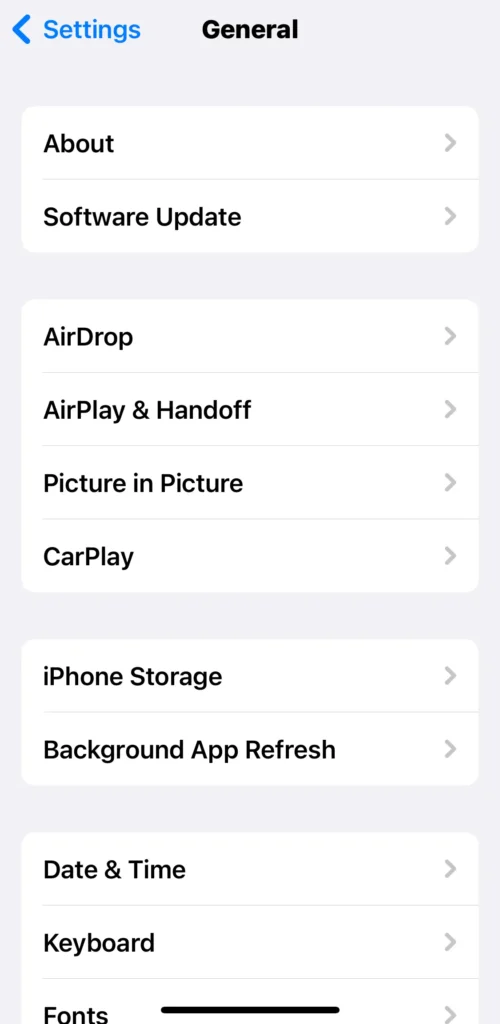
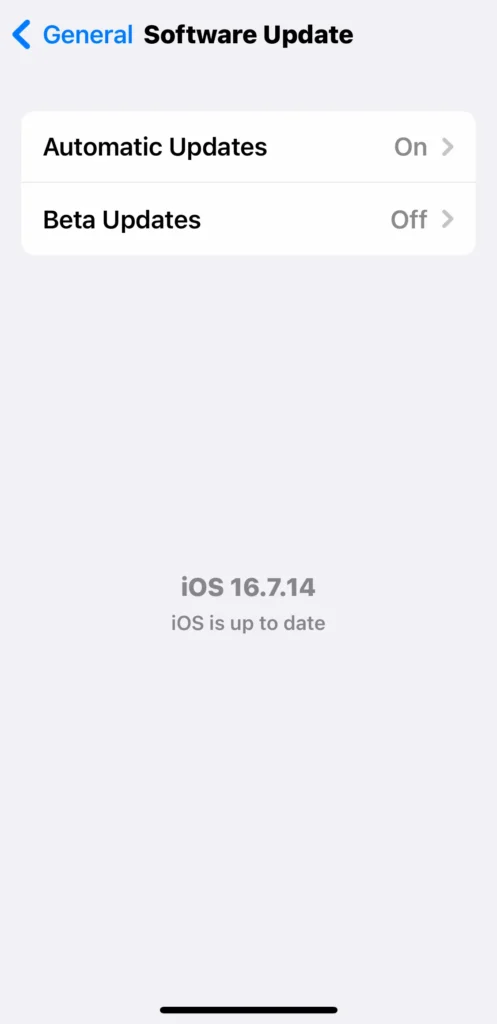
- Go to Settings > General > About. Note your Software Version (e.g., iOS 16.7.14 on my iPhone X, or iOS 26.2 on my iPhone 14 — the latest in February 2026). See screenshots below from my iPhone X.
- Go to Settings > General > Software Update.
- Turn Automatic Updates ON (tap it if not already).
- Keep Beta Updates OFF to avoid test versions of iOS.
- If an update shows, tap to install it.
Important Notes
- If it says “Up to date,” that means it’s running the latest version your phone can support — it doesn’t necessarily mean its safe nor that it will keep getting security patches forever.
- In my iPhone X case, this is the last iOS it can run — it has reached its end of life (no more updates). However, in January 2026 due to a serious security risk Apple did unusually issue an update for many obsolete phones, my iPhone X included, it had been on iOS 16.7.13 which was to be the last, now it is on 16.7.14
- Apple changed naming: iOS 18 (2024) was the last old-style number. Starting late 2025, they switched to yearly numbers (iOS 26 for 2026, etc.). It’s about clear dating, not more significant changes.
For Android Users (Samsung, Google Pixel, etc.): Android is the name of the software used to operate these, and many other phones.
- Open Settings. Maybe you never opened settings before, learn something new today !!
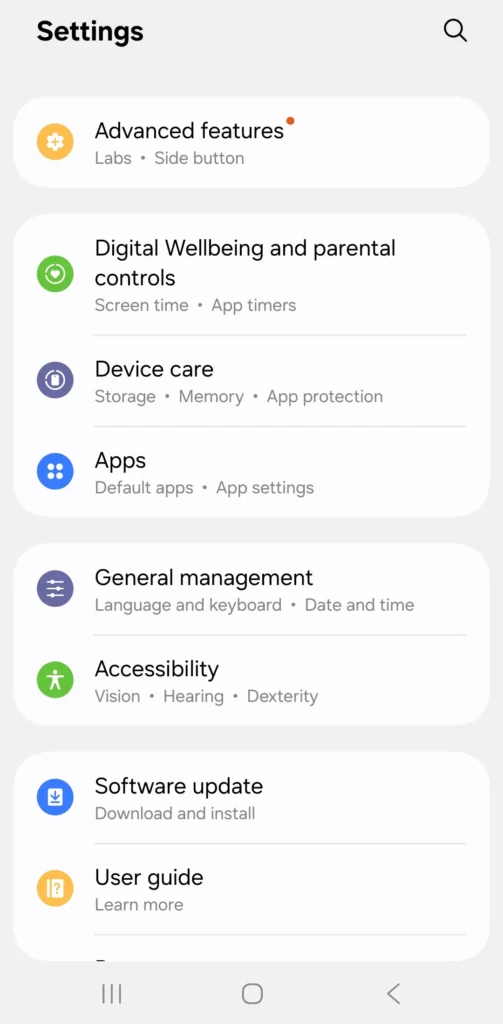
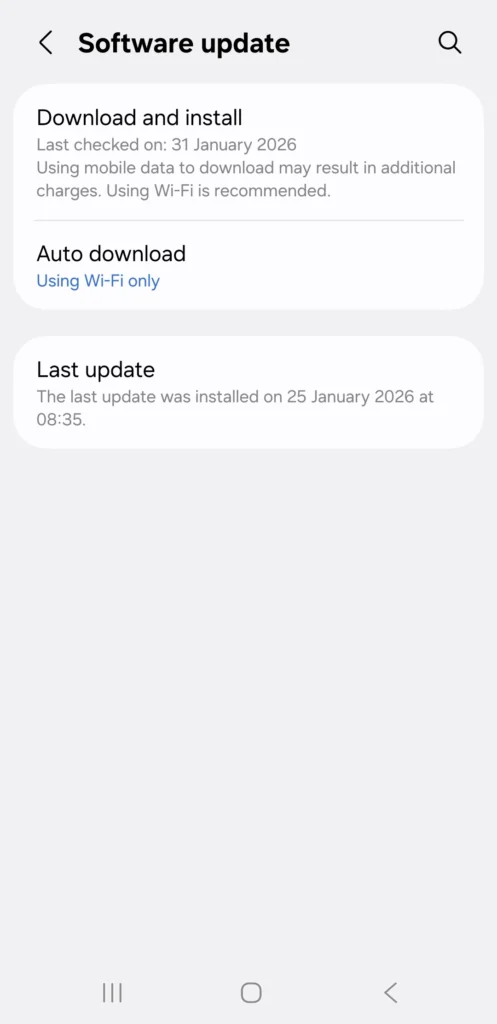
- Look for Software update. Near the bottom of the screen. Screenshots from my Samsung A16 below.
- Tap Download and install
- It may show your current security patch level (e.g., “31 January 2026” for January 2026) and when it was last updated. Currently showing on my Samsung A16 phone.
- You will also see Auto download, it should also show Using Wifi only this means it will automatically download updates as they are issued and when this happens you will get a message saying do you want to install an update, just press to accept.
- If Auto download shows Never press it and then press Using Wifi only. This will turn it to Automatically to download future Updates.
- What to Look For:
- Security patches usually arrive monthly on supported phones.
- If your patch level is older than 3–4 months and no update appears, your device may be near or past its support end (no more regular security fixes).
- Android phones can only upgrade to a certain major version of Android — after that, they rely on security patches alone until the manufacturer stops support.
The Banking Warning
Here’s something crucial that catches people off guard: many banks will eventually block their apps from working on End of Life phones.
If your banking app suddenly refuses to open or authenticate, and you haven’t done anything wrong, it’s possibly not a bug. It’s your bank’s risk department protecting your money from a device they can no longer trust.
You can check these links here of the major banks where they give the minimum versions of Apple iOS or Android for their banking apps to work. The other banks have similar requirements.
- The Barclays app is available on iPhones running iOS 15 and above, Android 8 and above.
- NatWest/RBS Our minimum operating system requirements for Android are 8.0 and above, iOS is 16.0 and above
- HSBC Our mobile banking app is available on iPhones and iPads running iOS 15 or higher. On Android devices, the app is available on Android 9.0, but you need to be using Android 10.0 or higher to use our latest features. Scroll down to this button “What devices can I use the HSBC UK Mobile Banking app on?
- Nationwide To use our app, your device must be running Android 8.0 or higher, or Apple iOS 15 or higher
- Lloyds Bank (and related like Bank of Scotland/Halifax) iOS 15 and Android 8 are the new minimum versions. Scroll down to Device updates/How to keep your device up-to-date.
- Other banks are the same or similar.
Consider this your first official warning that your phone has entered the danger zone.
The “Digital Expiry” Calendar: Is Your Phone Still Guarded?
I’ve put together this table to show you when the “Locksmith” stopped visiting these popular models. If your phone is on this list, unless it has NONE in the last column, then it is officially At Risk. Which means your data on the phone could be stolen, this includes, photos, passwords, emails, in fact anything.
| Brand | Model Series | Year Released | Current Status (Feb 2026) | Security Risk |
| Apple | iPhone 8 / X | 2017 | End of Life, but Feb 2026 rec’d certificate update * | 🟠 HIGH |
| Apple | iPhone XS / XR | 2018 | End of Life, but Feb 2026 rec’d certificate update * | 🟠 HIGH |
| Apple | iPhone 11 Series | 2019 | Final Security Updates | 🟡 MEDIUM |
| Apple | iPhone 12 / 13 | 2020/21 | Supported (Active) | 🟢 LOW |
| Apple | iPhone 14 | 2022 | Supported (Active) | ✅ NONE |
| Samsung | S9 / S10 / S10e | 2018/19 | End of Life | 🔴 CRITICAL |
| Samsung | S20 / S20 FE | 2020 | End of Life (Jan 2025) | 🔴 CRITICAL |
| Samsung | S21 / S21 Ultra | 2021 | Quarterly Support (Ending 2026) | 🟡 MEDIUM |
| Samsung | S22 / S23 / S24 | 2022-24 | Supported (Active) | ✅ NONE |
| Pixel 4 / 5 | 2019/20 | End of Life | 🔴 CRITICAL | |
| Pixel 6 / 6 Pro | 2021 | Final Security Year | 🟡 MEDIUM | |
| Pixel 7 / 8 / 9 | 2022-24 | Supported (Active) | ✅ NONE | |
| Motorola | Moto G Series (G8/G9) | 2019/20 | End of Life | 🔴 CRITICAL |
| Motorola | Moto G (2022/23 models) | 2022/23 | Final Security Year | 🟠 HIGH |
| Motorola | Moto G Power / Stylus (2020/21) | 2020/21 | End of Life | 🔴 CRITICAL |
| Xiaomi | Redmi Note 8 / 9 | 2019/20 | End of Life | 🔴 CRITICAL |
| Xiaomi | Redmi Note 11 / 12 | 2022/23 | Supported (Quarterly) | 🟡 MEDIUM |
| Nokia (HMD) | Nokia G or X Series | 2021/22 | Ending Soon | 🟠 HIGH |
| OnePlus | OnePlus 8 / 9 Series | 2020/21 | End of Life | 🔴 CRITICAL |
| OnePlus | OnePlus 11 / 12 | 2023/24 | Supported (Active) | ✅ NONE |
| TCL | TCL 20 / 30 Series | 2021/22 | End of Life | 🔴 CRITICAL |
* This Certificate update means that until at least Jan 2027 FaceTime, iMessage, and Apple sign-in should still work, it will probably be extended again next year. Without the update, these services would have stopped working by Feb 2026.
Looking at this table now, I see some phones I’ve owned that are on here. iPhone X, obviously. Before that, an iPhone 6s that served me well for years, the battery is now dead. The Nokia 3310 I mentioned earlier is not here, clearly, as it was in use well before the Smart Phone era.
My Engineering Observations :
The “Democratisation of Security” Revolution (Finally)
Something remarkable happened in 2025. Samsung announced that even their £200 budget phones now get 6 years of updates. Six years! For a budget phone!
This is extraordinary. Five years ago, you’d be lucky to get 2 years on a budget device. Now Samsung, Google, and some others are offering 6-7 year commitments across nearly their entire range.
Why this matters: For the first time in smartphone history, you don’t need to spend £1,000+ to get long-term security. A pensioner, like many of us, on a fixed income can buy a £200 Samsung A16 and have guaranteed security until 2030.
This is how it should be. Long-term support shouldn’t be a luxury feature. It should be a right.
The “Longevity Leaders” Emerge
Right now, the companies offering the longest support are:
- Samsung: 7 years for flagships (S25 series), 6 years for mid-range (A-series)
- Google: 7 years for Pixel phones
- Apple: 6-7 years typically, sometimes longer with critical patches
- Honor: Surprisingly, 7 years for their Magic series
The “Xiaomi Cliff”
Xiaomi makes excellent hardware, Beautiful phones, Great specs, Competitive prices. But they retire models quickly. The popular Redmi Note 12 hits EOL in Q1 2026. That’s maybe 2 years of support if you bought it at launch.
Always remember to check a manufacturer’s update policy before buying—specifications aren’t everything.
If you want a phone that lasts like a good car, invest in brands that promise long-term support. Or at least check their update policy before buying.
I used to recommend Xiaomi phones to people on a budget. I don’t any more. It’s not worth the short support window.
The lesson: Always check a manufacturer’s update policy before buying. Specifications aren’t everything.
The Engineer’s Guide: What Should You Do?
Probably you fall into one of these categories:
Scenario 1: “My phone just reached End of Life”
Your banking app started blocking you, or you read this article and checked your phone and realised it’s past its support date.
What to do:
You have options. Not all of them involve buying a new phone immediately.
Option A: The “Isolated” Approach Keep the old phone but remove sensitive apps. Delete your banking apps. Don’t use it for online shopping. Use it for calls, texts, WhatsApp with family, taking photos. Do your banking on a newer tablet or computer instead.
Option B: The “Safety First” Approach
Upgrade to a phone with long-term support. Look for devices with minimum 6 years of security updates. Samsung A-series, Google Pixel, or if budget allows, iPhone.
Option C: The “Offline” Approach Seek out gadgets that don’t need apps. Like the Esky Key Finder I reviewed recently, it doesn’t connect to your phone, so it can’t become obsolete due to software updates. You’ll find it halfway down that page.
Pick based on your budget and risk tolerance. But do something. Don’t just keep using an End of Life phone for banking and shopping and hope for the best.
Scenario 2: “My phone still works fine, but I’m planning ahead”
Good! This is the smart approach.
What to do:
Check your phone’s End of Life date using the table above or by searching “[your phone model] end of life date” online.
If you’ve got 2+ years left, relax. Keep using it. But start budgeting for replacement so you’re not forced to make a panicked decision when the time comes.
If you’ve got less than a year left, start researching replacements now. Read reviews. Compare options. Look at long-term support commitments. Take your time while you still can.
Scenario 3: “I want to gift a phone to elderly parent/friend”
What to do:
Choose based on what they already use. If they’re on iPhone, get them another iPhone they already know how to use it. If they’re on Android, get them another Android.
Look for phones with 6+ years support so you’re not having this conversation again in 2 years.
Consider screen size. My eyesight isn’t what it used to be (shocking, I know, given my age), and a 6.7″ screen makes a real difference compared to a 4.7″ screen, measured diagonally from opposite corners. Those of you my age will probably understand inches, for the younger readers 6.7″ is 170mm and 4.7″ is 120mm. TV’s are also measured in inches across diagonal corners.
Budget options: Samsung A16 (£200, 6 years support)
Mid-range: Google Pixel 9a (£499, 7 years support)
Premium: Latest iPhone or Samsung flagship (£800+, 7 years support)
Scenario 4: “I’m still not sure what to do”
The “Grandchild Test” applies here. Get help.
Invite over someone tech-savvy. Could be a grandchild, neighbour or that friend who always seems to know about phones. Make them a cup of tea. Show them this article. Ask them to help you decide based on your priorities.
They’ll probably know which phone suits you within 5 minutes of conversation.
What they can help with:
- Checking your current phone’s End of Life date
- Looking up new phones with long-term support
- Setting up the new phone when it arrives
- Transferring contacts, photos, WhatsApp messages
Make it social, not stressful. You’re not admitting defeat by asking for help—you’re being smart about delegation.
I’ve asked for help plenty of times in my engineering career. Usually from specialists who knew more than me about specific topics. No shame in it whatsoever. Smart people ask questions to learn something new.
For the Detail-Oriented: The Master Database
My Recommended Tool: If your phone isn’t in my table above, you can use these links to take you to a more extensive database of some, not all phones, and status regarding updates and End of Life. It is a highly respected, community-run database, well trusted and safe, that engineers use to see exactly when a piece of tech expires.
Quick Checklist: Is your phone still safe in 2026?
- Check the last security patch date
- Install any available updates
- Use strong authentication (passcode, Face ID, Fingerprint)
- Avoid unknown links and apps that are not from the Manufactures App Store. The most well known the App Store for iPhones and Google Play for Android phones.
- Run an antivirus scan from time to time
- Consider upgrading if support has ended
The Engineer’s Final Word
I still love my iPhone X. It’s a beautiful piece of kit. But as an engineer, I have to respect the data.
Technology doesn’t wear out like a pair of shoes; it “expires” like a carton of milk. It might look fine, but you use it at your own risk.
Your safety—digital and physical—is a system. And every system requires maintenance. Knowing when your tech’s maintenance period has ended is the first step to staying secure.
Stay safe out there.
Verified March 2026; prices change; educational only
About The Author