Last Updated on 31 May 2026 by Gary Perspective Gadgets
“Alexa, What’s the Weather?” — Why the Amazon Echo Dot/Spot is one of the Most Useful Gadgets I’ve Recommended
As an Amazon Associate I earn from qualifying purchases. This post may contain affiliate links — if you click through and buy, I may earn a small commission at no extra cost to you.
My friend asked me for help one evening last winter looking rather sheepish. She is in her mid-seventies, sharp as a tack, and not easily impressed by technology. She had been given an Amazon Echo Dot by her daughter at Christmas, and it had been sitting in its box for six weeks because, as she put it, she was not sure what it actually did. We sat down with a cup of tea, plugged it in, and within about twenty minutes she was asking it to play Glenn Miller, set a reminder to take her blood pressure tablets, and check whether it was going to rain before her afternoon walk. She looked at me and said, “Why didn’t anyone explain it like that?”
That conversation is why I am writing this post. As a retired Chartered Civil Engineer (B.Sc., C.Eng., MICE) with over 40 years of designing systems that had to be reliable, practical, and used by real people rather than specialists, I apply the same standard to the technology I recommend. The fundamental principle I learned on construction sites is this: the best system is the one that people actually use. Not the cleverest one. Not the most feature-rich one. The one that gets used every day without anyone having to think too hard about it.
The Amazon Echo Dot clears that bar with room to spare. It is one of the few pieces of technology I can recommend to seniors without qualifications, without lengthy instruction sessions, and without worrying that it will end up back in its box.
What Is Alexa, and What is an Amazon Echo Dot/Spot?
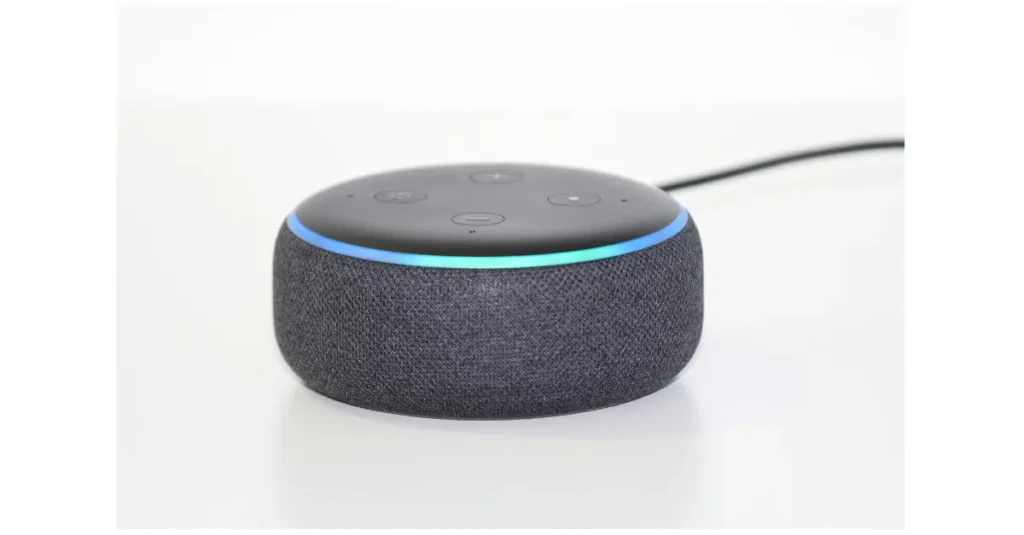
Let me separate two things that often get muddled. Alexa is the voice assistant, the software brain that listens to your questions and responds. The Echo Dot is the physical device, a small rounded speaker, roughly the size of a large apple, that sits plugged in on your worktop, bedside table, or bookshelf. Alexa lives inside the Echo Dot.
You do not press any buttons to use it. You simply say “Alexa” followed by whatever you want to know or do, and it responds out loud within a second or two. “Alexa, what time is it?” “Alexa, play Radio 4.” “Alexa, set a timer for twenty minutes.” “Alexa, what is the weather tomorrow?” That is genuinely all there is to the basic operation.
Think of it like a telephone exchange operator from decades past. You pick up the phone, say what you need, and the operator connects you or gives you the answer. The Echo Dot works the same way, except the operator never sleeps, never sounds impatient, never minds if you ask the same question twice, and costs less than a monthly bus pass to run.
Why the Amazon Echo Dot and Spot is Different From Other Gadgets
Most technology asks something of you. A smartphone requires you to find the right app, navigate menus, type accurately on a small keyboard, and remember passwords. A laptop requires you to sit down at a desk. A tablet requires you to remember where you left it. All of these are reasonable things, but they add friction, and friction is what stops people using technology consistently.
The Echo Dot removes almost all friction. It is always plugged in. It is always on. It is always listening for its name. You do not need your glasses to use it, because there is nothing to read. You do not need to hold anything, because there is nothing to hold. You do not need to find it, because it sits in one fixed spot. For anyone with arthritis, reduced dexterity, or simply a preference for not wrestling with touchscreens, this matters enormously.
It is also forgiving in a way that most technology is not. If you phrase your question slightly wrong, it will usually still understand you. If you forget to say “Alexa” first, it will simply wait patiently until you try again. I have watched complete technology sceptics take to it within minutes, which I cannot say about any other device I have reviewed for this blog.
Which Amazon Echo Dot or Spot Should You Buy?
The Echo Dot 5th Generation
This is the one I recommend as the starting point for most people. The spherical design, roughly the size of a large apple, sends sound in all directions which means it works wherever you place it in the room. Bedroom, kitchen, living room — it does not matter. The sound quality is better than you might expect from something this compact, perfectly adequate for BBC Radio 2, podcasts, and asking Alexa questions throughout the day.
It has a built-in temperature sensor, so “Alexa, what temperature is it in here?” gives you an instant answer without hunting for a thermometer. A built-in motion sensor can also trigger smart home actions when you walk into a room, though most people never use this feature and will simply enjoy the Alexa basics.
The price difference between models is small at full price, but during Amazon’s Prime Day in summer and the November sales, the Echo Dot often drops to around £22. It is well worth waiting for one of those events if you are not in a hurry.
Pros: Excellent all-rounder, works in any room, good sound for the price, temperature sensor, no subscription needed for daily use, frequently discounted.
Cons: No screen, so timers and weather information are spoken rather than displayed. If you prefer to glance at the time without speaking, read on.
Best for: Anyone new to Alexa who wants a straightforward, reliable device for any room in the home.
Check current price on Amazon UK (paid link). Currently £54.99
The Echo Spot Newest 5th Generation
The Echo Spot is specifically designed for the bedside table, and it shows. The front face is split between a small colour touchscreen in the upper half and a speaker grille below, giving it the shape of a compact alarm clock rather than a speaker. It sits at a natural angle for reading from bed.
The 2.83-inch screen displays a full clock face in your choice of colour and design, the current weather, upcoming alarms, and timer countdowns. When music plays, it shows the track name and artist. When a notification arrives, it appears on screen. To snooze an alarm, you tap the screen rather than fumbling for a button in the dark. Small things, but exactly the sort of thing that matters at seven in the morning.
One thing worth stating clearly: the Echo Spot has no camera. There is no video calling on this device. That will disappoint some people, but for a bedroom device many people will consider it an advantage. There is no lens pointing at you while you sleep. Voice calls to other Alexa devices are supported, just not video.
The sound quality is good for the size. Reviewers note it is lively and energetic, better than you would expect from a bedside alarm clock, and well suited to radio and spoken-word content. It will not fill a large sitting room, but for a bedroom it is very capable.
Pros: Proper colour touchscreen for easy reading, excellent bedside alarm clock, no camera (privacy advantage), tap-to-snooze, customisable clock faces, motion sensor for room-based automations, all Alexa features included.
Cons: No video calling capability, smaller screen than the Echo Show 5, no temperature sensor.
Best for: Anyone who wants a smart alarm clock for the bedside table with a proper readable display, or who prefers not to have a camera in the bedroom.
Check price on Amazon UK (paid link). Current price £79.99
The Echo Show 5 Newest Generation
The Echo Show 5 is where a screen becomes genuinely useful rather than just decorative. The 5.5-inch display is nearly twice the size of the Echo Spot’s screen, and it opens up two capabilities that the Spot simply cannot offer: video calling and the ability to see your doorbell camera.
The video calling feature is the one that matters most to my readers. If your children or grandchildren have an Echo device with a screen, or the Alexa app on their phone, you can video call them directly from the Show 5 by saying “Alexa, video call Janet.” Their face appears on the screen; yours appears on theirs. No smartphones involved, no apps to open, no passwords. For anyone who finds the mechanics of a video call on a tablet or phone frustrating, this is a genuinely useful simplification.
The built-in 2-megapixel camera has a physical shutter — a small sliding cover you can pull across to block the lens entirely when you do not want it active. You can see it is covered because the shutter is visible. This is a more trustworthy privacy mechanism than a software setting, because it is a physical barrier rather than a digital one.
On the privacy question more broadly: some people are perfectly comfortable with a camera in the bedroom, particularly when the shutter is there and usable. Others prefer the Echo Spot specifically because there is no camera at all. Both are reasonable positions. The right choice depends on your priorities, not on one being inherently better than the other.
The screen can also display live feeds from compatible video doorbells, including Ring. If you have a Ring doorbell on the house and an Echo Show 5 in the kitchen, you can see who is at the door without moving from your chair. That combination works particularly well for anyone who finds answering the door quickly a challenge.
One thing to note: Netflix is not compatible with the Echo Show 5. Amazon has not made that partnership work, so it will not stream Netflix. Prime Video works well, and the screen is adequate for a short programme, though at 5.5 inches you would not watch a feature film on it. For glancing at the weather, taking a video call, or seeing who is at the door, the screen size is exactly right.
Pros: Video calling with family, physical camera shutter for privacy, larger 5.5-inch display, can show Ring doorbell camera feed, all Alexa features, good sound quality, frequently discounted.
Cons: Has a camera (which some people prefer to avoid in a bedroom), Netflix not compatible, slightly larger footprint than the Spot.
Best for: Anyone who wants to video call family without touching a smartphone, or who has a Ring doorbell and wants to see who is at the door from a screen in the kitchen.
Check the current price on Amazon UK. (paid link). Current price £89.99
What Can Alexa Actually Do? The Uses That Matter Most
I am going to be specific here, because Alexa “voice assistant” is a vague description that tells you very little. These are the things my neighbours, friends, and readers actually use it for every day.
Timers. This sounds trivial until you realise how many people have burned pans, over boiled eggs, or left the kettle going cold because they got distracted. “Alexa, set a timer for ten minutes” is one of the most-used commands on every Echo device in the country. The clock version shows the countdown visibly, which is even more useful.
Reminders. “Alexa, remind me at eight o’clock every morning to take my tablets.” It then says, at eight o’clock the following morning: “This is your reminder to take your tablets.” You can set one-off reminders or repeating daily ones. For anyone managing medication schedules, this is genuinely useful in a way that no pill box or sticky note ever quite manages.
Weather. “Alexa, will it rain today?” The answer is spoken aloud immediately, with no phone to pick up and no app to open. For anyone planning a morning walk or deciding whether to take a coat, this is the kind of small friction-removal that accumulates into a real difference.
Radio. This is the one that genuinely surprises people. Say “Alexa, play BBC Radio 2” and it plays. No setup, no account, no subscription, nothing to enable. TuneIn, the internet radio service, comes pre-loaded on every Echo device, which means every UK radio station is available the moment you plug it in. Radio 4, Radio 5 Live, Classic FM, local stations — all free, all immediate. “Alexa, turn it up a bit” adjusts the volume by voice. For anyone who normally searches for the remote, navigates a television menu, or fiddles with a DAB radio, this alone is worth the price of the device.
Music. This is where it is worth being honest, because the answer depends on what you already have. Without any subscription at all, asking for “Frank Sinatra” gives you a Frank Sinatra-style station rather than a specific song on demand. It plays his music and similar artists, which for background listening is perfectly pleasant, but you cannot reliably request My Way and hear exactly that recording.
If you already have Amazon Prime for your shopping and delivery, as roughly half of UK households do, Prime includes Amazon Music, which gives a broader music library and works well for general listening on the Echo. For full on-demand access — asking for any specific song and hearing exactly that — Amazon Music Unlimited costs around £10.99 per month, or approximately £5 per month on a Single Device plan tied to one Echo. Many people find free radio more than sufficient. Music Unlimited is genuinely good value if music is central to daily life, but it is not required to get real daily use from the device.
General questions. “Alexa, what time does the Post Office open?” “Alexa, how many tablespoons in an ounce?” “Alexa, what year was the Forth Bridge completed?” It will not always have the answer, and it occasionally gets things wrong, so I would not use it for anything medical or legal. But for the kind of quick factual questions that would otherwise mean getting up to find your phone, it works well.
Calls. If a family member also has an Echo device or the Alexa app on their phone, you can call them by voice. “Alexa, call Janet.” The call connects through the speaker, hands-free, without touching any buttons. This is particularly useful for anyone with limited dexterity.
On Alexa+: All three devices carry “Alexa+ Early Access” on their current Amazon listings. Alexa+ is Amazon’s new AI-enhanced version of Alexa, currently being rolled out in the UK. During the Early Access period it is available at no charge. After Early Access ends, Amazon has confirmed it will remain free for Prime members, and available to non-Prime customers for £19.99 per month. For the vast majority of daily uses described in this post — radio, timers, reminders, weather, music, calls — the standard version of Alexa that comes with every Echo device is entirely sufficient. Alexa+ adds more conversational flexibility and AI capabilities, but it is a bonus on top of an already capable assistant, not a prerequisite for getting good value from the device.
Skills — What They Are and Why They Matter
When people talk about Alexa “Skills,” they are using Amazon’s word for add-on capabilities. Think of it like a new television. Out of the box it receives the main channels — BBC One, ITV, Channel 4. Skills are like adding Freeview or a streaming service. You are not replacing what is already there; you are adding more on top.
The Echo Dot comes with a substantial set of built-in abilities straight from the box: timers, alarms, weather, TuneIn radio, general questions, reminders, and calls. Skills extend that further. The BBC Sounds skill, for example, adds the ability to rewind live radio (“Alexa, ask BBC Sounds to rewind ten minutes”), access BBC podcasts on demand, and catch up on programmes you missed. It is the same BBC Radio 2 you already get for free through TuneIn, but with more control over how you listen.
Most skills are free. You enable them either by voice (“Alexa, enable BBC Sounds”) or through the Alexa app on your phone. Once enabled, they stay enabled permanently and work every time you ask for them. Some skills carry a cost — premium sports coverage or ad-free music services — but those are entirely optional, and the ones relevant to most seniors for everyday use cost nothing.
The BBC Sounds skill is the one I would suggest enabling first. It requires a free BBC account, which your grandchild can set up in a couple of minutes during the initial setup session. After that, BBC iPlayer Radio, podcasts, and the full BBC archive are available by voice, at no charge, for as long as you own the device.
The Question Everyone Asks: Is It Always Listening?
Yes. The Echo Dot is always listening for the word “Alexa.” That is how it works. It cannot respond to your requests if it is not listening for them.
It is worth being clear about what this means in practice. The device is not recording and transmitting everything you say in the room. It is listening only for the wake word, and the microphones are specifically tuned to detect that word rather than general conversation. When it hears “Alexa,” it sends what follows to Amazon’s servers to process the request.
Amazon does store voice recordings of your queries, which can be reviewed and deleted through the Alexa app. There is a physical mute button on the top of every Echo device. When it is pressed, the ring glows red and the microphones are physically disconnected. The device will not respond to anything until unmuted. If you want privacy in a specific conversation, pressing that button gives you certainty.
My honest view: the privacy considerations are real and worth knowing about, but for most people they are not a reason to avoid the device. Millions of Echo devices have been sold and used in UK homes without significant incident. If you would prefer not to have a always-listening device in your home, that is a perfectly reasonable position, and I respect it. But if your concern is the practical risk rather than the principle, that risk is small. Which leads us to Security see below.
Security
Dots and Spots are run by software, software needs regular updates to update features, install security patches (to prevent virus), this is all automatic. Mobile Phones do the same, I wrote a Blog about this recently. Amazon currently support updates on these devices for 4 years, after that they will still work but not get updates. You can check the length of updates on this Amazon Help page.
Setting It Up
The Echo Dot requires a Wi-Fi connection, a power socket, and a smartphone or tablet to complete the initial setup through the free Alexa app. The app walks you through connecting the device to your Wi-Fi network, which takes about five minutes. After that, no app is required for daily use.
If you do not want to set it up yourself, this is exactly the right job for a grandchild, a tech-savvy neighbour, or a family member visiting for the weekend. The Grandchild Test applies perfectly here: it is the kind of task a fifteen-year-old can complete before the kettle has boiled, and they will probably enjoy showing you what it can do. After setup is complete, you never need the app or a smartphone again to use the device.
There is no aerial to position, no wires to run across the room, and no receiver to mount near the boiler. You plug it in, it connects to your Wi-Fi, and it is ready. From an engineering standpoint, the installation complexity is roughly equivalent to setting up a new clock radio. Simpler, in fact.
What Alexa Cannot Do, Being Honest
Alexa gives wrong answers sometimes, particularly on obscure facts or recent news. I would not use it as a source for anything important. The more specific your question the more accurate will be the answer, it is called a Prompt these days of AI (Artificial Intelligence). When working with computers we always used to say garbage IN garbage OUT !!
It cannot help with complex multi-step tasks reliably. Asking it to book a GP appointment or fill in a form is beyond its practical capability for most users.
Without Wi-Fi it does not work at all. If your broadband goes down, the Echo Dot becomes a paperweight until the connection is restored.
It occasionally mishears the wake word and activates when it was not intended, usually when someone on the television says something that sounds similar. This is mildly irritating rather than a serious problem, and it becomes less frequent as the device learns the acoustics of your home.
Some strong regional accents, particularly some Scottish and Northern Irish varieties, can cause occasional recognition difficulties. Amazon has improved this considerably over recent years, and most users report reliable performance, but it is worth being aware of.
Who Is This Really For?
For anyone living alone. Having a voice in the room that can answer questions, play music, set reminders, and call family members adds a practical layer of independence that is difficult to quantify but easy to appreciate. It is not a substitute for human contact, but it reduces the small moments of frustration that accumulate when you have no one to ask.
For anyone managing medication. The repeating daily reminder feature is genuinely useful. Set it once, and it reminds you every morning without fail. No apps to open, no screens to navigate.
For anyone with arthritis or limited dexterity. If typing on a smartphone is painful or difficult, voice control removes that barrier entirely. Everything that would normally require pressing small buttons or navigating menus can be done by speaking.
As a gift from adult children. The Echo Dot is one of the most thoughtful practical gifts you can give a parent or older relative, provided you set it up properly before giving it. A pre-configured Echo Dot, connected to the recipient’s Wi-Fi and with a few family members added as contacts, is genuinely ready to use from day one.
For the genuinely sceptical. My recommendation is always the same. Buy one, put it on the kitchen worktop for two weeks, and use it only for timers and the weather. That is enough to establish the habit. Everything else follows naturally. If after two weeks you find it has made no difference to your daily routine, return it. But in my experience, that almost never happens.
The Engineer’s Final Word
I have spent forty years evaluating systems by one measure above all others: does it work reliably for the people who need to use it? Not for engineers. Not for enthusiasts. For ordinary people going about their day.
The Echo Dot works. It works first time, every time, for questions that would otherwise require finding your phone, putting on your glasses, and navigating three menus. It works when your hands are covered in flour in the kitchen. It works in the dark when you cannot find the bedside lamp switch. It works at the volume of a normal speaking voice from across the room.
Technology should serve people, not the other way around. The Echo Dot, almost uniquely in my experience, respects that principle.
Check the price on Amazon UK. The Echo Spot with Clock is the version I recommend for most seniors.
—
About The Author